
Odoo 19 vs Odoo 17: The Most Important New Features and Updates Explained
Executive overview
Odoo 19 is not just a cosmetic update over Odoo 17; it is a release where AI, automation, and compliance become first‑class citizens across the suite. While Odoo 17 focused heavily on a fresh UI and usability overhaul, Odoo 19 brings deeper intelligence, faster performance, and new specialized apps such as ESG and Equity that address governance and sustainability requirements many mid‑market companies are just starting to face.
For a business currently running Odoo 17, upgrading directly to 19 (skipping 18) means leaping over two generations of improvements. The most visible gains are:
- Pervasive AI assistants (email drafting, search, server actions, document analysis) instead of the limited, accounting‑centric AI of Odoo 17.
- A cleaner, faster interface with smarter control panels, better mobile layouts, and workflow‑oriented tweaks that reduce friction in daily use.
- Stronger performance and caching, making list views, navigation, and reporting feel noticeably more responsive than in 17.
- Big functional upgrades in sales, CRM, inventory, POS, accounting, HR, and website/e‑commerce.
- Entirely new business capabilities such as Equity management and ESG reporting, which simply do not exist in Odoo 17.
The sections below walk through the most important changes from a business and technical perspective, explicitly contrasting Odoo 19 with Odoo 17 so decision‑makers can see what is genuinely new rather than incremental.
1. AI becomes a core platform capability
How Odoo 17 handled AI
In Odoo 17, AI capabilities were relatively narrow. They were mostly visible around OCR and document processing (for example, reading bills and expenses), and some light suggestions in accounting or reconciliation, but AI was not a unifying concept across the suite.
There was no system‑wide AI assistant, no AI‑driven search, and certainly no way for a functional user to generate automations by just describing them in natural language. In practice, most 17 deployments still relied on traditional server actions, Python code, and manual filters.
What changes with Odoo 19
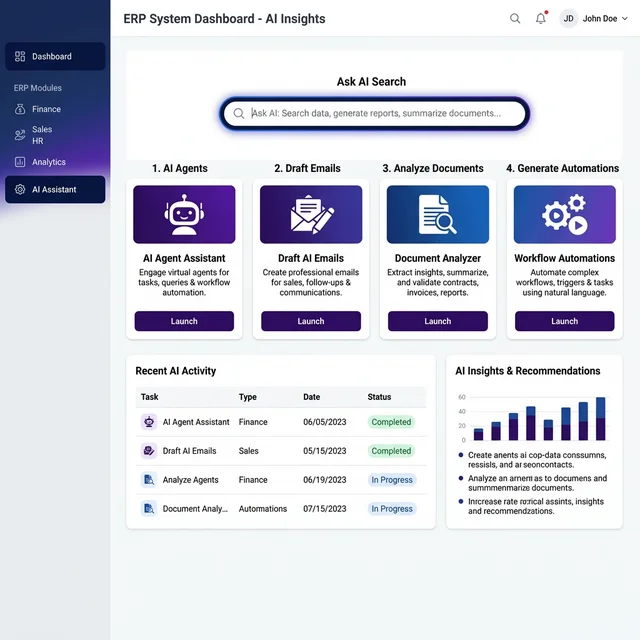
Odoo 19 elevates AI from “nice add‑on” to “first‑class engine” by introducing several cross‑suite capabilities:
- AI Agents and personal assistants that can search, summarize, and suggest actions across business objects.
- Ask AI Search, where users type plain‑language questions instead of building complex domain filters, and the system returns relevant records.
- Draft with Odoo AI inside editors and chatter, helping users generate or improve emails, descriptions, and internal notes on the fly.
- AI‑powered document analysis that understands PDFs, knowledge articles, and web links, then surfaces structured data or summaries directly inside Odoo.
- AI server actions and prompts, allowing an administrator to type something like “Notify the manager when a task is overdue by 3 days” and let Odoo generate the automation logic.
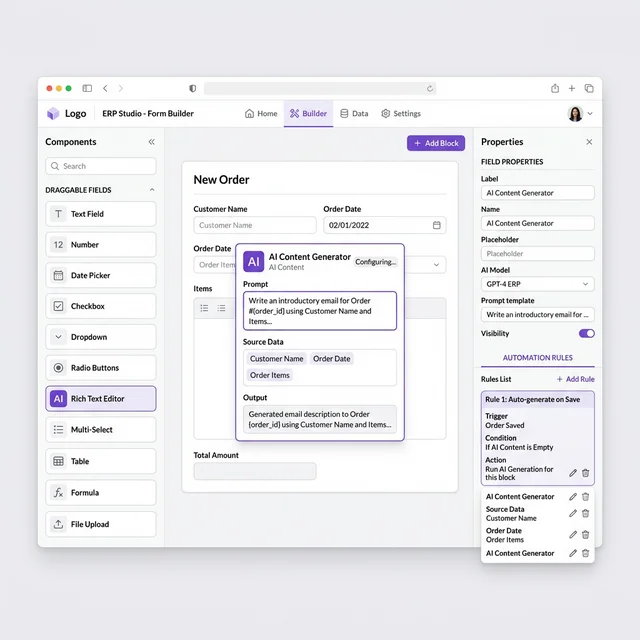
- AI fields in Studio, where custom fields can automatically generate content (for example, product descriptions) based on other attributes.
In day‑to‑day business terms, this means that in Odoo 19:
- Sales teams draft and personalize responses faster based on email context.
- Support teams handle repetitive replies and knowledge lookups with less manual typing.
- Functional consultants implement more automation without touching Python.
- Management gets faster access to insights by asking questions instead of building ad‑hoc filters.
For a company running Odoo 17, these capabilities represent entirely new workflows rather than small improvements.
2. User interface and UX: from big redesign (v17) to daily‑workflow polish (v19)
Odoo 17’s UI baseline
Odoo 17 delivered a major visual overhaul: a new design system, modernized menus, improved dropdowns, and a generally cleaner interface across most core apps. It was the “big design release,” replacing the v16 look‑and‑feel with a much more contemporary UI.
Odoo 19’s improvements on top of 17
Where 17 focused on visuals, Odoo 19 focuses on speed and friction in everyday work:
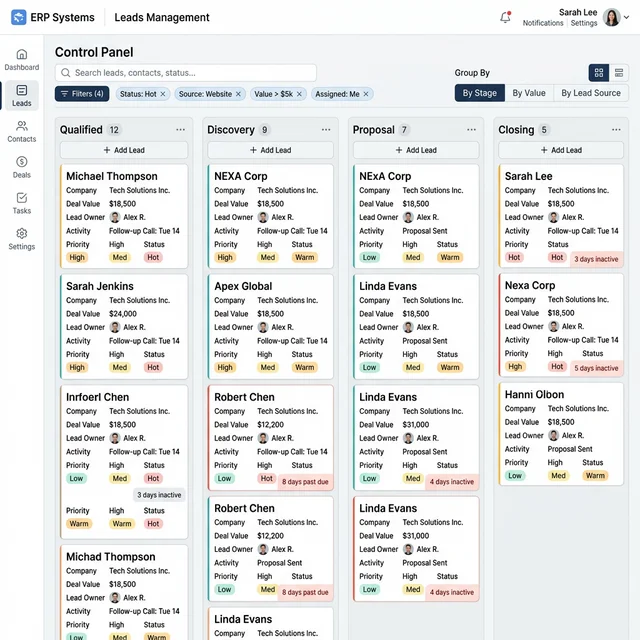
- The control panel (search bar, filters, grouping, and views) appears almost instantly when users switch between list, kanban, or form views, reducing the feeling of lag.
- Navigation elements and frequently‑used actions are organized so that common flows require fewer clicks, especially on mobile.
- Warning messages are shown as non‑blocking banners at the top instead of modal pop‑ups that stop the workflow.
- Modules such as Sign and Accounting receive redesigned layouts with more logical grouping of options and actions.
- List and kanban views add more drag‑and‑drop convenience, rotting indicators (for inactive records), and better visual density.
Some partners measure up to roughly 30 percent faster page loads in high‑traffic SaaS contexts when moving from pre‑19 versions to 19, due to improved caching of data and translations. For a 17 user, the combined effect is that the system feels lighter and more responsive, even on the same infrastructure.
From a functional‑consulting standpoint, these UX refinements reduce user training overhead and help with adoption, especially for non‑technical teams.
3. New apps: ESG and Equity
ESG app: sustainability and compliance built‑in
Odoo 17 has no native app dedicated to ESG (environmental, social, and governance) metrics and reporting. Any sustainability tracking or CSRD‑style reporting typically requires spreadsheets or external systems.
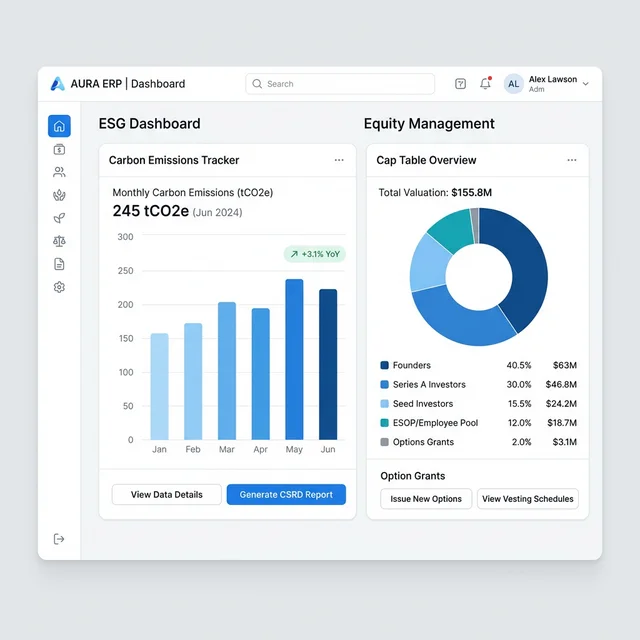
Odoo 19 introduces a full ESG app designed to help companies measure and report their ESG footprint:
- Automated ESG reporting, generating disclosure‑ready reports from operational data.
- Real‑time emissions tracking, where CO₂ footprints are calculated across purchases and activities.
- AI‑assisted emission factor assignment, suggesting and applying emission factors to transactions automatically.
- One‑click exports for compliance packs that can be shared with auditors and stakeholders.
Because regulations such as the EU Corporate Sustainability Reporting Directive (CSRD) expand in scope in 2025, many mid‑sized businesses that previously ignored ESG will be pulled into formal reporting. Odoo 19’s ESG module directly targets that need.
Equity app: cap‑table and ownership management
Again, Odoo 17 offers no native module for managing cap‑tables, options, and equity transactions; these are usually handled in standalone tools or spreadsheets.
Odoo 19 adds an Equity app that centralizes ownership and governance data:
- Shareholder registers and cap‑tables with automatic updates when equity transactions occur.
- Tracking of option grants, warrants, and other instruments, including fully‑diluted ownership calculations.
- Governance records for board members, auditors, and signatories, directly linked to equity data.
- Multi‑company equity management for groups, with both entity‑level cap‑tables and consolidated group views.
- Tight integration with HR and Finance so that equity events align with payroll and financial reporting.
For growing companies—especially startups and multi‑entity groups—this replaces an entire category of subscription tools and improves auditability.
4. Performance, caching, and scalability
Where Odoo 17 stands
Odoo 17 already offers solid performance for SMB‑scale workloads, but it was primarily a UI and usability‑driven release rather than a performance‑driven one. Large databases and high‑volume operations work, but often require tuning and powerful infrastructure.
What Odoo 19 adds
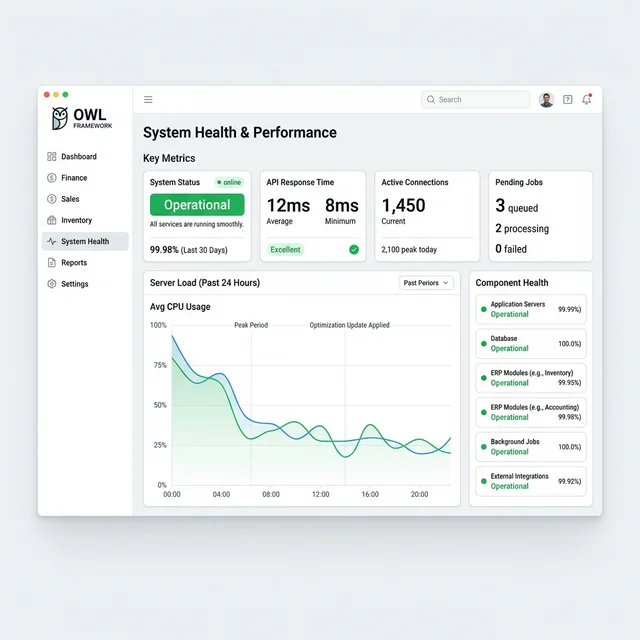
Odoo 19 introduces a series of technical optimizations that benefit both cloud and on‑premise deployments:
- Aggressive caching for control panels and translations, reducing time to first interaction on most screens.
- More efficient database queries for common operations such as navigating between views or re‑loading lists.
- Framework‑level work on the OWL (Odoo Web Library) frontend stack, especially for the Website module, improving rendering speed and responsiveness.
- Benchmarks from partners and Odoo ecosystem articles report notable page‑load improvements and smoother behavior under high concurrency.
For businesses coming from Odoo 17, the practical impact is felt in:
- Faster navigation for power users who live in list and kanban views.
- Quicker mass edits, imports, and exports.
- Less perceived latency in reporting and dashboards.
This is particularly relevant for large multi‑company databases or sites with heavy e‑commerce traffic.
5. CRM and Sales: smarter pipelines and quoting
CRM and Sales in Odoo 17
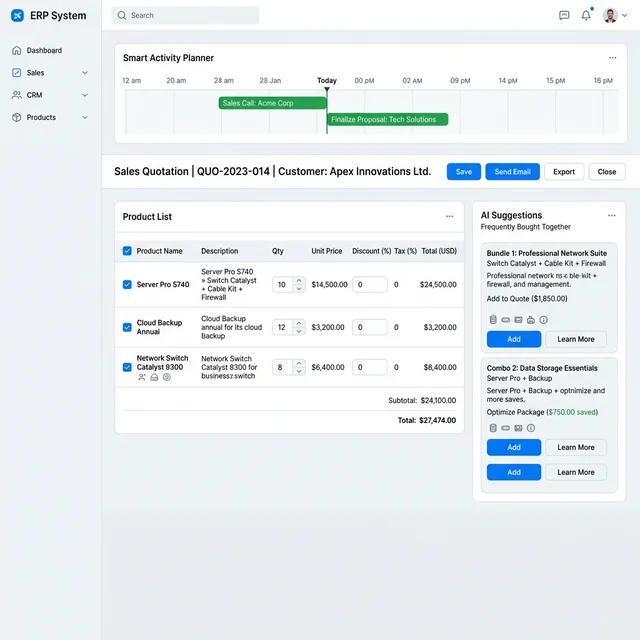
Odoo 17 delivers a robust CRM and Sales stack with pipeline management, activity scheduling, quotations, price lists, and basic forecasting. It is fully usable, but automation and AI are limited, and collaboration is more traditional.
New capabilities in Odoo 19
In Odoo 19, CRM and Sales gain both AI features and workflow refinements:
- Improved lead scoring and prioritization, enabling sales teams to focus on high‑probability deals first.
- Smarter activity planning, including better grouping of activities (today, tomorrow, next week) and richer views in kanban and Gantt.
- More informative cards in kanban, including indicators for “rotting” leads or opportunities that have been inactive too long.
- AI‑assisted email drafting directly from the chatter or email composer, speeding up responses.
- Enhanced reporting and dashboards for sales performance.
On the Sales side specifically, Odoo 19 strengthens quoting and order flows:
- A smarter quotation builder with contextual product suggestions and optional/add‑on product flows.
- Better support for combo products and bundles, which is useful for retail, hospitality, and subscription‑like offerings.
- Enhanced integration between Sales, CRM, and website/e‑commerce so that leads and customers experience more consistent journeys.
Compared to Odoo 17, the net gain is a more proactive, AI‑assisted sales engine with fewer manual touches per deal.
6. Website and e‑commerce: faster, richer, and more SEO‑aware
Baseline in Odoo 17
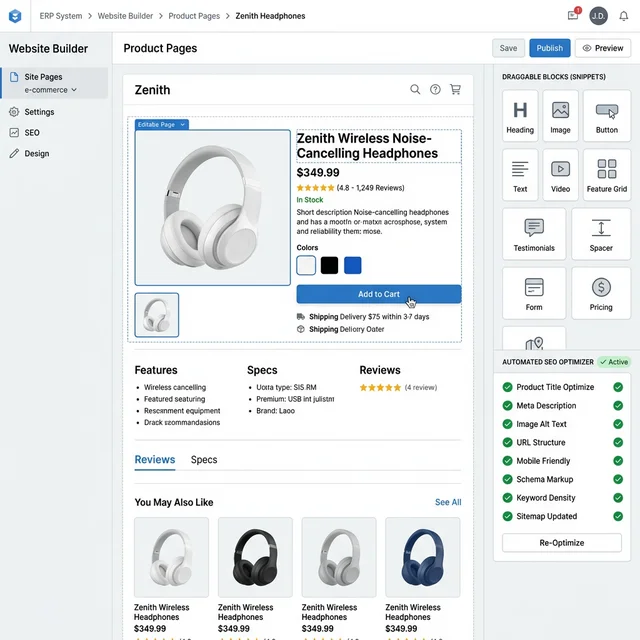
Odoo 17 already includes a powerful website builder with drag‑and‑drop snippets, basic SEO fields, and a capable e‑commerce engine. However, performance, modern SEO practices, and omnichannel marketing integrations are more limited than in 19.
What Odoo 19 brings
Odoo 19 makes the website and e‑commerce experience a headline area of improvement:
- The Website app is fully migrated to the OWL frontend framework, delivering faster rendering and smoother interactions.
- New website snippets (contact forms, payment logos, galleries, and more) provide richer content building blocks without custom code.
- Better blog layouts, improved portal customization, and more flexible event pages, including standalone landing pages for events.
- Automated SEO and accessibility validation, giving editors real‑time suggestions while they build pages.
- Breadcrumb control and improved navigation for complex information architectures.
- Sharper, more conversion‑oriented product page designs and shop layouts tailored to modern e‑commerce best practices.
- Multi‑website management improvements so that multiple brands or regions can share a single Odoo instance cleanly.
On the e‑commerce side specifically:
- New layout options for shop and product pages make stores look more modern.
- Checkout flows are refined, with clearer steps and better mobile support.
- Integrations with platforms like Google Merchant Center, TikTok, Meta, and other marketing channels are expanded, simplifying product feeds and campaigns.
For a company on Odoo 17, these changes are particularly valuable if online sales or content marketing are core to the business, because they reduce reliance on custom theme work and external SEO tools.
7. Inventory, purchase, and supply chain
Where Odoo 17 stands
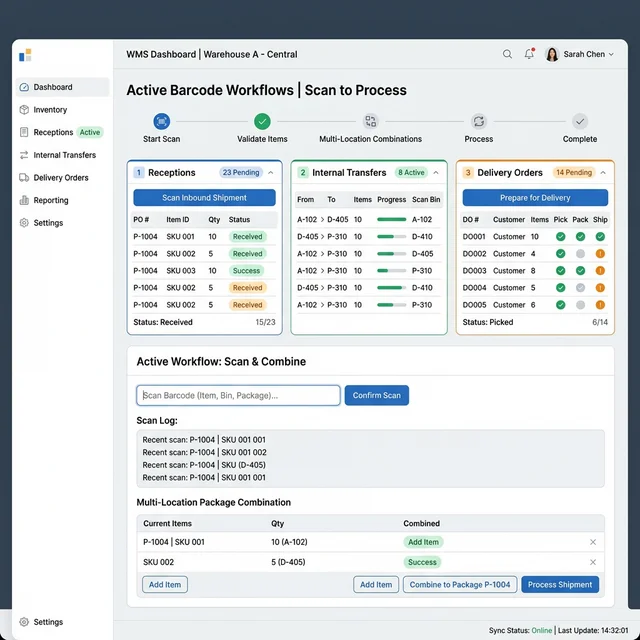
Odoo 17 already supports multi‑warehouse operations, routes, barcode scanning, and strong integration between Inventory, Purchase, and Manufacturing. For many SMEs, this is “good enough,” but there is room for better accuracy and flexibility.
Odoo 19’s improvements
Odoo 19 sharpens inventory and purchasing with features aimed at accuracy and smoother operations:
- More flexible management of units, packages, and packaging combinations, helping warehouses that deal with multiple packing hierarchies.
- Smarter handling of purchase orders and receptions, including better suggestions for quantities and replenishment.
- Enhanced inventory valuation and cost tracking, important for manufacturing and distribution businesses.
- Improved reporting on stock movements and availability.
Third‑party summaries of Odoo 19 also emphasize better WMS behavior, multi‑location support, stronger barcode workflows, and tighter integration with logistics providers compared to earlier versions.
Compared with Odoo 17, these enhancements reduce stock discrepancies, improve replenishment decisions, and make it easier to run complex warehouses without heavy customization.
8. Manufacturing, projects, and services
Manufacturing and MRP
Between Odoo 17 and 19, the Manufacturing app sees iterative but meaningful gains:
- Better product catalogs and enriched bills of materials with clearer structures and attributes.
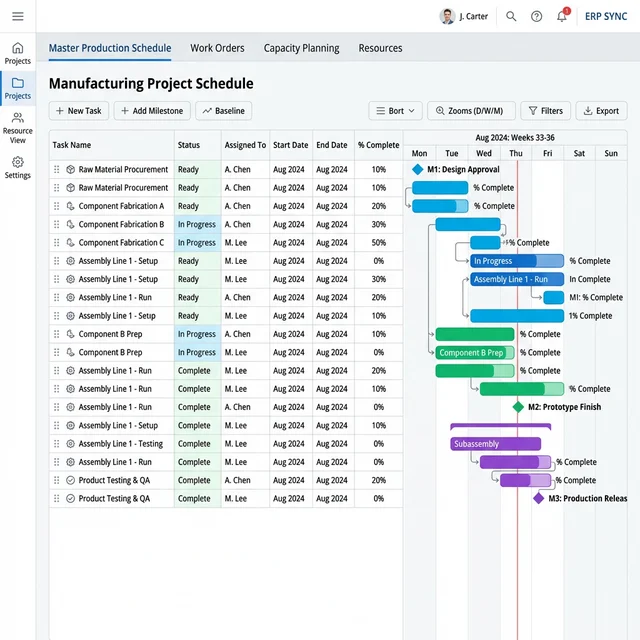
- Improved master production schedule (MPS) and real‑time Gantt views, making capacity planning more transparent.
- Smoother work‑order handling on the shop floor, including clarity around steps and statuses.
These enhancements help production planners and shop‑floor operators align more easily, reducing errors and bottlenecks.
Project management and services
Odoo 17 already includes tasks, kanban, timesheets, and basic Gantt views. Odoo 19 takes this further by focusing on automation and usability:
- More powerful task automation rules: trigger‑based actions that assign tasks, send notifications, or move stages without code.
- A significantly improved Gantt view, with smoother drag‑and‑drop, buffer days, collapsible absences, and better handling of dependencies.
- Activity planning that integrates tightly with CRM and other apps, creating more consistent follow‑up behavior.
For service businesses running Odoo 17, these features reduce manual project administration and improve visibility into resource allocation.
9. Accounting and finance: automation and compliance
Accounting in Odoo 17
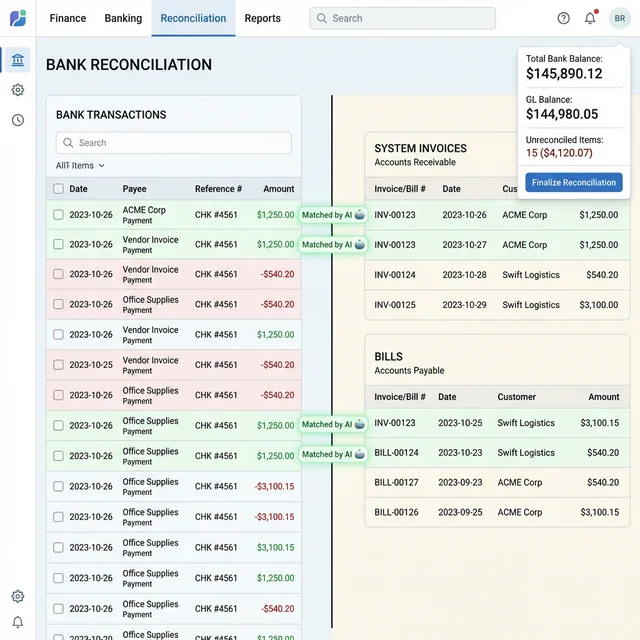
Odoo 17 offers a complete accounting suite including invoicing, payments, bank reconciliation, and reporting that already covers many SMB needs. Light AI helps with document reading and matching, but much of the work is still manual.
What Odoo 19 adds
Odoo 19 brings a new wave of automation and compliance‑oriented features to accounting:
- Faster and more accurate bank reconciliation, with improved matching suggestions and reduction in manual clicks.
- Enhanced invoice processing and expense handling, heavily supported by AI and better document analysis.
- Stronger, more flexible financial dashboards and reports, helping finance teams see real‑time performance.
- Improvements in multi‑bill matching, stock valuation, and period closing steps.
- Expanded global compliance capabilities, including tax and reporting updates.
Compared to 17, this means less time spent on repetitive tasks and more confidence in compliance and audit trails. For growing organizations or those in regulated industries, this is a compelling reason to move beyond Odoo 17.
10. HR, payroll, and time off
HR in Odoo 17
Odoo 17 delivers core HR capabilities: employee records, contracts, recruitment, time off, and basic appraisals. It works, but history tracking and leave handling require more manual oversight.
New in Odoo 19
Odoo 19 refines HR and time management with a clearer focus on lifecycle visibility and planning:
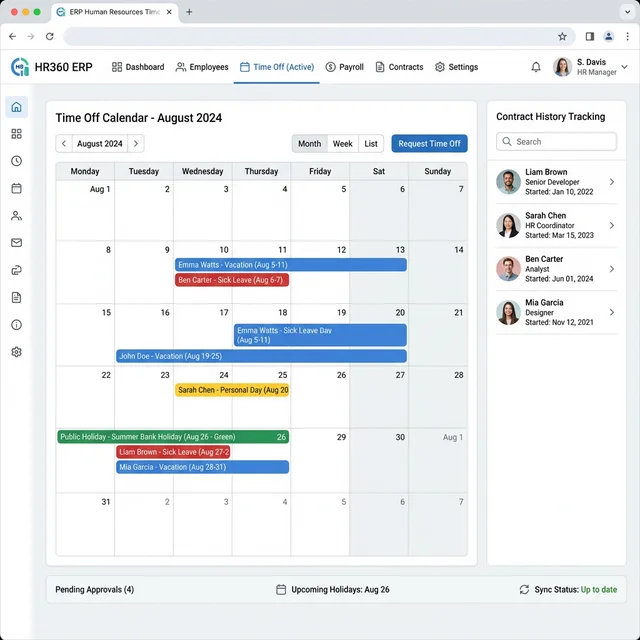
- Contract history tracking inside the employee profile, preserving previous positions and salary levels instead of overwriting them.
- A revamped Time Off module with a fresh interface and smarter behavior:
- Full support for public holidays without manual balance adjustments.
- Ability to request overlapping time‑off entries with clean handling by the system.
- Localised data availability even without enabling Payroll, which is useful for global teams.
These are features that simply are not available in Odoo 17 out of the box, and they streamline HR administration for multi‑country deployments.
11. POS and retail
POS in Odoo 17
Odoo 17’s POS is already stable and integrated, with basic combos, payment terminal integrations, and restaurant features. However, its configuration and interface require more manual tuning.
POS in Odoo 19
Odoo 19 improves POS for both configuration and daily use:
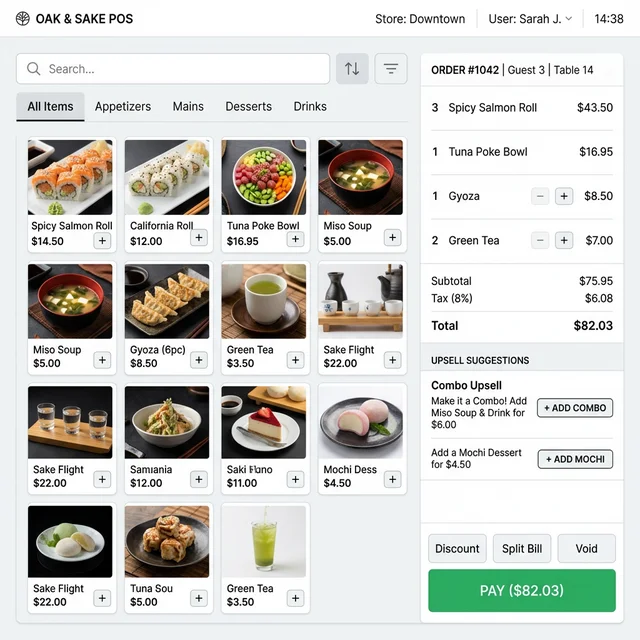
- A cleaner, more responsive POS interface, particularly on mobile and touch devices.
- Preset configuration templates so new POS sessions can be set up quickly with recommended defaults.
- Easier configuration of product combos and upsells, simplifying combo offers and bundled products.
- Broader and more robust payment terminal integration, with better syncing to Accounting.
- Visual and workflow updates for restaurants, including table management and dark mode.
If a business runs retail stores or restaurants on Odoo 17, these v19 upgrades directly affect cashier speed, training time, and customer experience.
12. Collaboration: Discuss, Live Chat, and knowledge sharing
Collaboration in Odoo 17
Odoo 17 provides Discuss, channels, and Live Chat, but the experience is more basic and often supplemented with external tools. Context switching is frequent and internal communication can become noisy.
What Odoo 19 introduces
Odoo 19 strengthens communication tools and integrates them deeper into business flows:
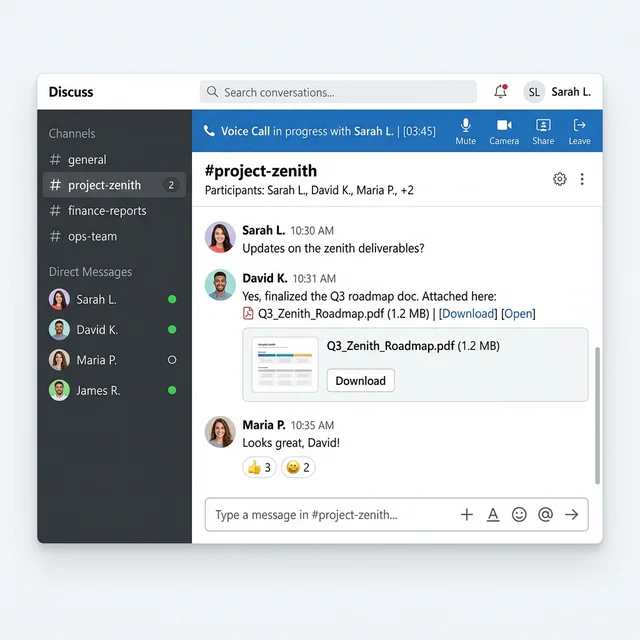
- Improved internal chat with emoji shortcuts, better structuring of conversations, and clearer context display.
- Push notifications for calls and improved alignment with vacation planning, helping teams schedule without clashes.
- In Live Chat, automatic transfer of chat content and attachments into helpdesk tickets, eliminating double data entry.
- More granular permissions and limits on parallel chats per agent, balancing workload.
These changes might seem small individually, but together they make Odoo 19 much closer to being the primary collaboration hub, whereas Odoo 17 often sat alongside other tools.
13. Studio, customization, and reporting
Customization in Odoo 17
Odoo 17 already includes Studio for low‑code customization, allowing users to add fields, automate flows, and design basic reports. However, AI support is nonexistent and designing complex documents can still be time‑consuming.
Enhancements in Odoo 19
In Odoo 19, Studio and the reporting stack advance in two key ways:
- AI in Studio: AI‑driven fields and content generation based on context reduce the time needed to build custom apps and forms.
- New field types (checkbox groups, dropdowns, rich‑text fields) improve flexibility in document and report design.
- A brand‑new or heavily improved audit report creator and reporting engine enable more sophisticated financial and management reports without heavy development.
- Dashboards and spreadsheets become more powerful and better integrated, offering drill‑down visualizations and ready‑to‑use business dashboards.
For organizations on Odoo 17, the cumulative impact is that far more customization work can be done by functional consultants and power users rather than developers.
14. Security, integrations, and future‑proofing
Security and integrations in Odoo 17
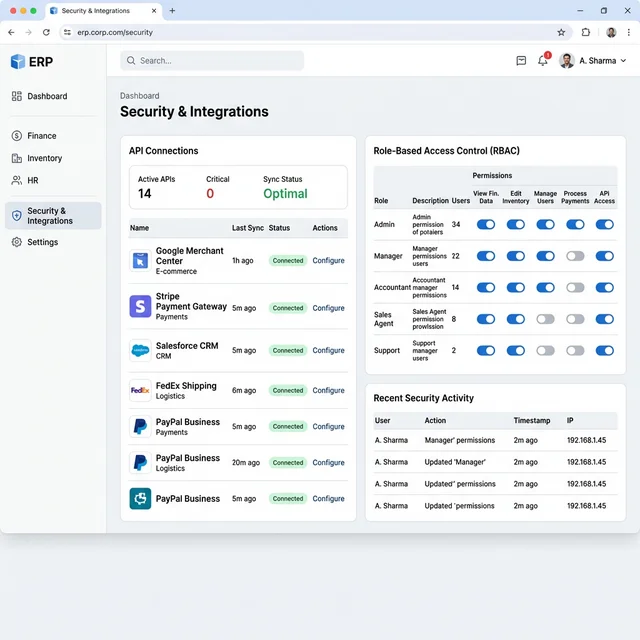
Odoo 17 delivers standard role‑based access controls, basic encryption, and APIs suitable for most integrations. It is production‑grade, but not yet aligned with the expanded integration ecosystem and compliance drivers appearing by 2025–2026.
How Odoo 19 moves forward
Based on partner analyses of v18→v19 and v17→v19, Odoo 19 strengthens the stack in several areas:
- Updated Python and PostgreSQL support, giving better scalability and longer support windows.
- Stronger and more granular role‑based access controls and security patches.
- Improved APIs and connectors, with official and partner‑built integrations to services like Google Merchant Center, Twilio SMS, Gelato, and major social platforms.
- Optimizations specifically aimed at high‑traffic SaaS deployments, including better handling of concurrent users and large datasets.
From a CIO or IT manager’s perspective, moving from Odoo 17 to 19 is not only about features—it is also about aligning with the versions that will receive security fixes and compatibility updates in the coming years.
15. Practical upgrade implications for a business on Odoo 17
What you gain by skipping directly to Odoo 19
If a company is currently on Odoo 17 and chooses to skip 18, the upgrade to 19 consolidates at least two generations of improvements:
- AI as a daily productivity tool, not just a back‑office OCR helper.
- Substantially better website and e‑commerce, ready for modern SEO, omnichannel marketing, and higher traffic.
- Stronger accounting and compliance, especially around reconciliation, reporting, ESG, and equity.
- Improved logistics and manufacturing flows for businesses with complex supply chains.
- Faster navigation and better UX, which helps user adoption and reduces training costs.
Key considerations before upgrading
Before moving from 17 to 19, organizations should still plan carefully:
- Review custom modules and ensure they are compatible with the new framework and API changes.
- Test high‑impact workflows—such as invoicing, POS, and manufacturing—in a staging environment.
- Prepare users for AI features through training so that they can trust and properly supervise AI‑generated content.
- Align the upgrade window with financial or operational cycles to reduce disruption.
However, ecosystem commentary is clear that for businesses wanting AI, better performance, and longer‑term support, Odoo 19 is a strategic rather than incremental upgrade over Odoo 17.